The route through the building matters
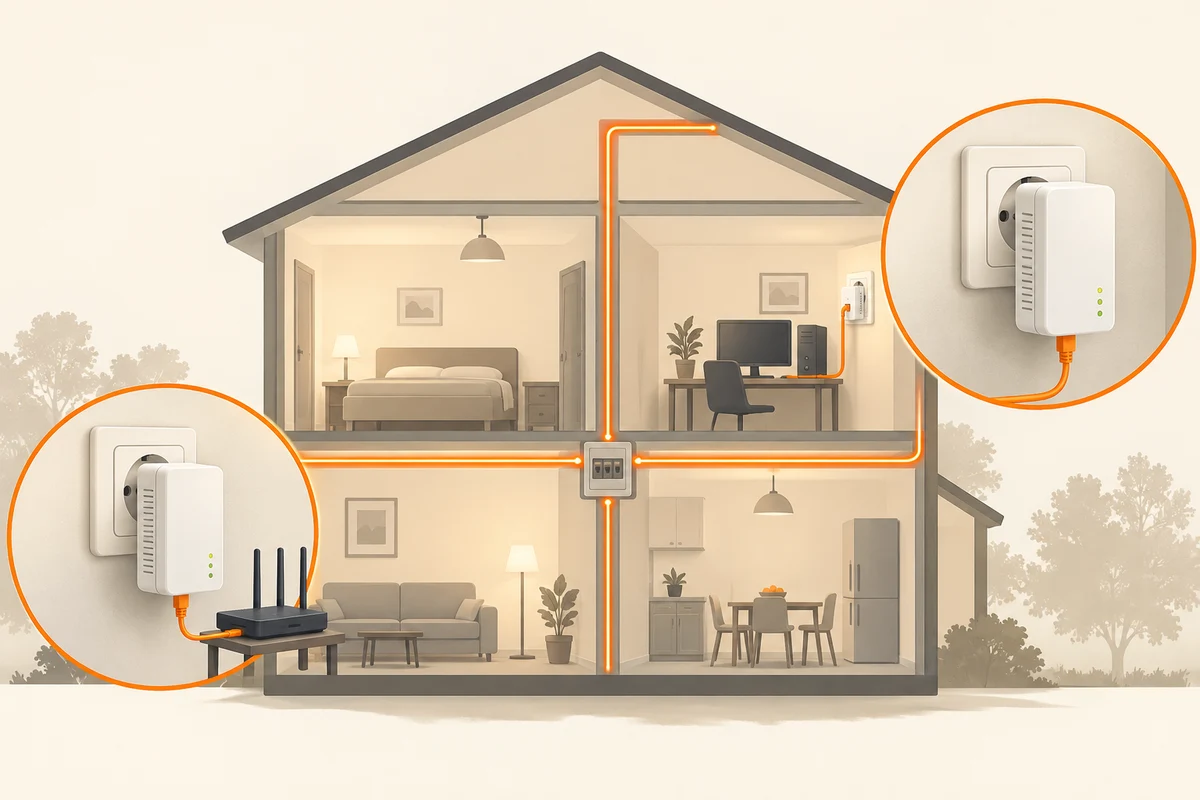
Powerline adapters carry network data over existing electrical wiring. One adapter connects to the router by Ethernet and another serves the distant desk. This can sound attractive when thick walls separate the rooms. The result still depends on the electrical installation. Two sockets that are physically close can be connected by an unfavourable wiring route.
Read the requirements of the particular system before buying. Different product families and standards are not automatically compatible. Include the manufacturer's electrical-circuit requirements in that check. Treat the advertised link rate as a specification, not a promise of speed in your home. It is not a measurement at your sockets with your appliances connected.
Make a comparison that isolates the link
Set up the adapters near one another as directed in their instructions, then move the remote unit to the intended desk. A laptop connected through a short Ethernet cable is useful for testing because it removes an additional Wi-Fi hop from the experiment. Begin with direct wall sockets: extension strips and filtering can interfere with the connection.
Try the task that actually matters. A video call needs stable delivery and few interruptions more than it needs one impressive download figure. If you want to copy files to local storage, test that route. An internet speed test mixes the powerline link with the provider's connection and a remote test server, so it cannot describe the local link alone.
Repeat the trial at different ordinary times. Electrical appliances can change the conditions. Note any consistent association instead of ordering new hardware after every interruption. Where appropriate, compare another wall socket in the room without doing any electrical work.
Recognise when another route is preferable
Large performance swings may mean powerline is a poor fit for that route. A properly installed Ethernet cable or a sensibly positioned wireless system could be more suitable. Adding another adapter does not automatically repair an unfavourable electrical path.
Secure the powerline network according to the manufacturer's instructions and check which units belong to it. Repeat the connection check after replacing a unit. Keep the model details and a short note of the socket combination that worked. If the desk moves later, that record helps identify what changed. Modifying sockets or the electrical distribution system is not part of an ordinary network setup and should not be improvised to improve the connection.