Prepare for movement, not just shutdown
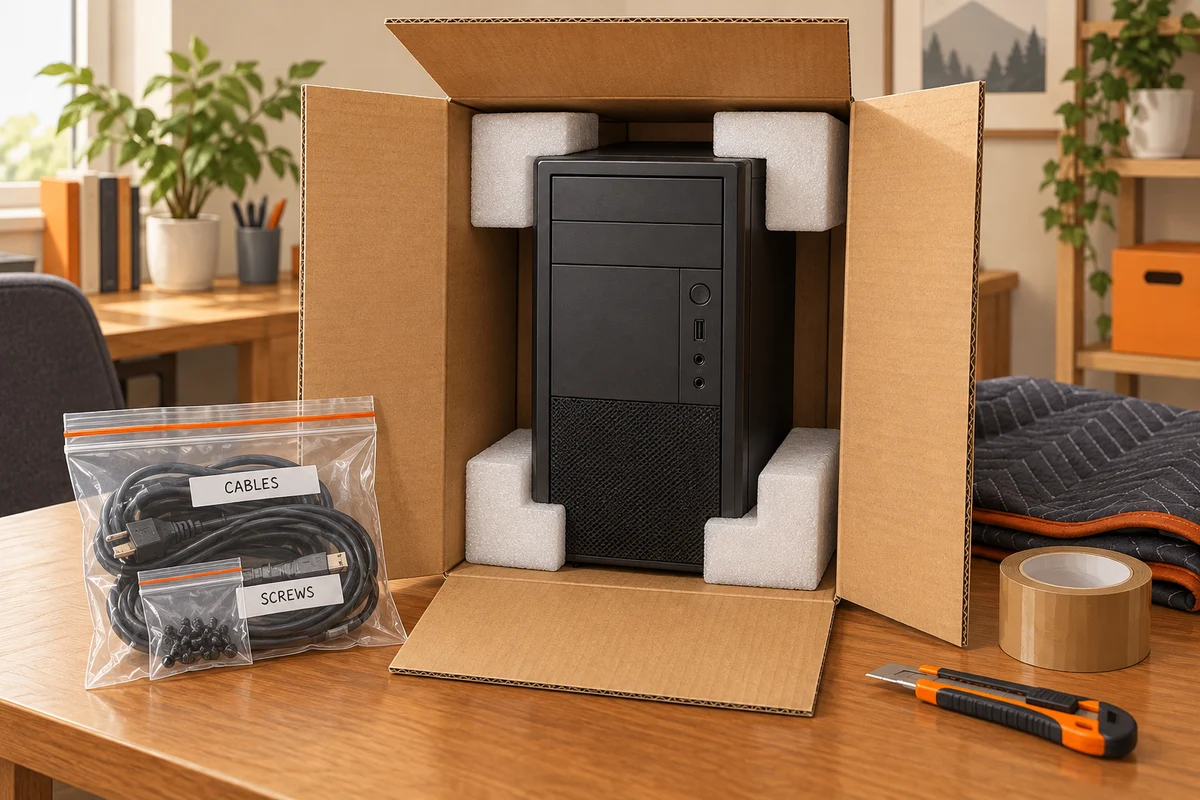
Before packing, make a separate backup of important files and verify that you can access it. Then shut the desktop down fully and disconnect its cables. Photograph the rear connections beforehand if another person will reconnect them. A labelled cable bundle prevents a rushed setup from turning into a search for the correct power lead or display cable.
Check the manufacturer's transport guidance, especially for a system with a large graphics card or heavy cooler. These components can place substantial loads on their mounts when the case is jolted. The appropriate protection depends on the design. Do not insert improvised packing inside the computer where it could damage components or later be forgotten.
Use packaging that supports the case
Original packaging is useful when it is intact and designed for the complete system. Otherwise, choose suitable cushioning that supports the enclosure and protects corners without pressing on glass panels or fragile connectors. Remove loose accessories from the case area. Pack a monitor separately with protection for the screen surface and stand arrangement.
Keep the computer stable in the vehicle and away from objects that can fall onto it. Avoid leaving it exposed to rain or extreme conditions. If it has moved from a cold environment into a warm one, allow it to reach a suitable condition before connecting power, following the manufacturer's guidance. Visible moisture is a reason to wait and investigate, not to test whether it will still start.
Inspect before switching on
After unpacking, look for external damage and remove every transport restraint specified in the packing procedure. Reconnect the correct cables without forcing plugs. If the system has suffered a significant impact, have it inspected rather than assuming that an intact outer panel proves the inside is unharmed. A rattling object should be identified before power is applied.
Reconnect in a manageable order
Start with a basic setup and confirm normal operation before reconnecting every peripheral. Check that storage, display and fans behave as expected. Keep the packing until the move is complete and the computer has been used normally. When shipping through a carrier, follow the carrier's packaging and battery rules as well as the computer manufacturer's instructions; a trip across the room and a parcel journey impose very different conditions.